
CWNE Case Study Essay
Silence by Design
How RRM Quiet IE Broke VoWiFi in a Clinical Environment
A regional hospital engaged me for a complete LAN and WLAN redesign, with VoWiFi calling as a primary use case.
I built the wireless design entirely in Ekahau AI Pro, using a VoWiFi coverage profile of -65 dBm with a calculated device offset of -8 dB for the handset in use. The access points, HPE Aruba AP515, were deployed with fixed transmit powers to keep coverage boundaries predictable, while RRM was allowed to manage the channel plan.
Predictive Design
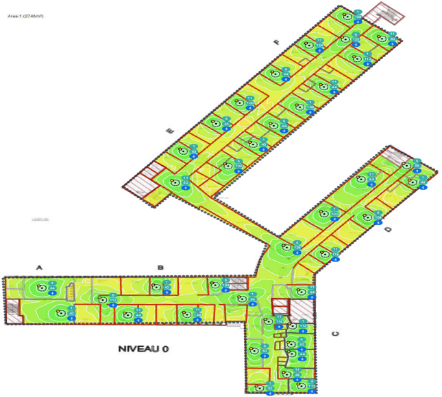
Primary Signal Strength
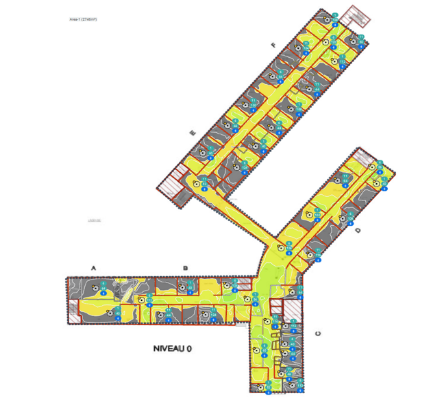
Secondary Signal Strength
The VoWiFi SSID (WPA2-PSK) ran 5 GHz only and was managed through Aruba Central on AOS10. WPA2-PSK was a deliberate choice over 802.1X: the Unify handset benefits from the simpler key exchange at every roam, which matters for sub-150 ms voice handoffs. To compensate for the weaker authentication model, the voice SSID was isolated on its own VLAN with a dedicated firewall policy, keeping it segregated from the corporate and guest SSIDs.
I deliberately restricted that plan to eight 20 MHz channels in the 5 GHz band: 36, 40, 44, 48, 52, 56, 60 and 64. The reasoning was to limit the number of channels the handsets had to scan. Before go-live I confirmed there were no DFS-driven channel changes on those channels, validating the design assumptions. They proved stable, so the set was safe to use. Any 40 MHz bonding seen post-deployment was applied by the client without my involvement.
The handset was a Unify OpenScape device. The vendor confirmed it shared the same chipset as the Ascom i63, so I configured the SSID according to the published HPE Aruba and Ascom i63 interoperability guide.
Before handover I validated the design on site. Coverage, roaming, and voice quality were all confirmed against the predictive model.
Validation Results
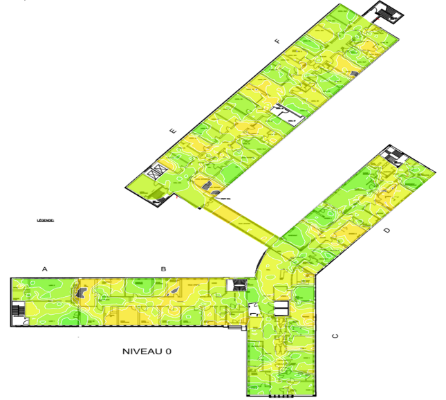
Primary Signal Strength
Secondary Signal Strength
The calls kept dropping
Shortly after the VoWiFi go-live, clinical staff began reporting dropped calls. The handsets displayed a "Voice Only" message, which the vendor documentation attributes to a loss of connectivity with the messaging server. Users lost connectivity before the device recovered a few seconds later.
That self-recovering behavior is what made the problem so hard. It was intermittent, it left no obvious trace, and the "Voice Only" message pointed firmly at the messaging server, not the wireless.
The hunt
I worked the problem using the CWNP structured troubleshooting methodology, eliminating layers one at a time. Server connectivity, VLAN, QoS marking, roaming behavior, RF coverage — none of it explained an intermittent, self-healing drop on a network that had measured clean.
So I went over the air. I spent several hours on site with an Ekahau Sidekick 2 capturing the affected channels. For most of that time the network behaved perfectly. Then, almost as I was packing up, the fault appeared live in the capture.
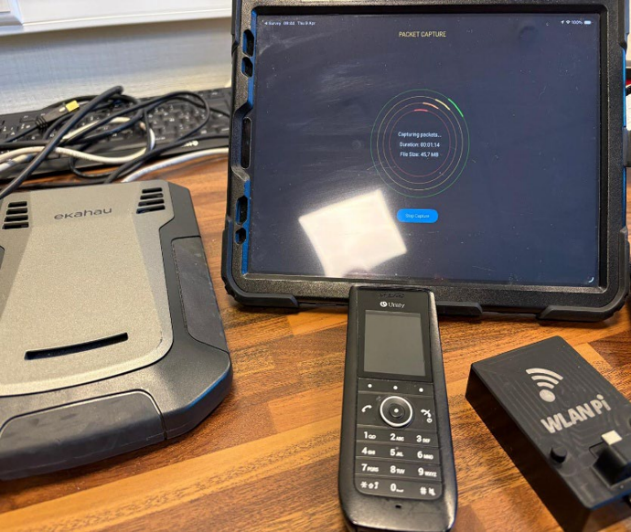
The frames
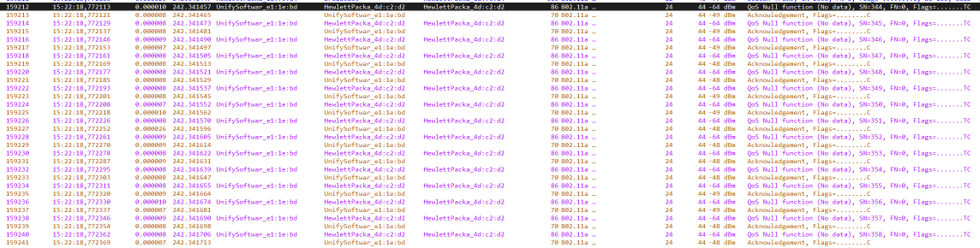
What I saw was not a coverage problem. At an RSSI of around -41 dBm, strong by any measure, the handset suddenly sent a burst of QoS Null Function frames. The power management bit was not set, the handset wasn't entering power save, it was flooding the air.
Suspects of the day
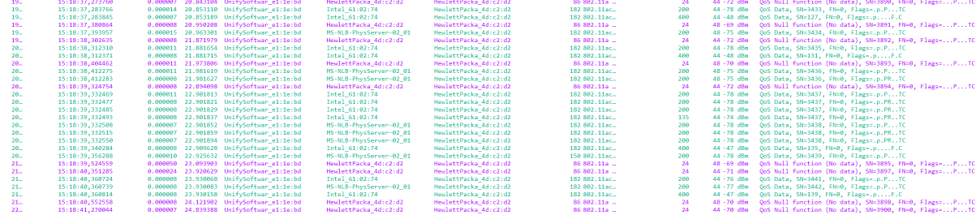
Problem phone: wlan.sa == 00:1a:e8:e1:1e:bd
Connected AP: wlan.da == 48:b4:c3:4d:c2:d2
Roaming AP: wlan.da == 34:8a:12:1c:7f:70 (adjacent room AP)
Normal behavior of a phone connected on the VoIP SSID
Burst of QoS Null Function frames (start of the event)
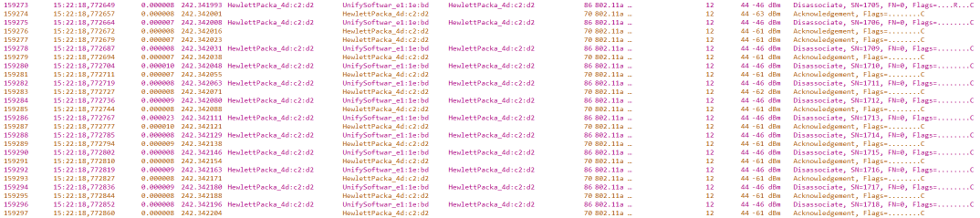
That burst was followed by an AP-initiated disassociation storm
AP-initiated disassociation storm
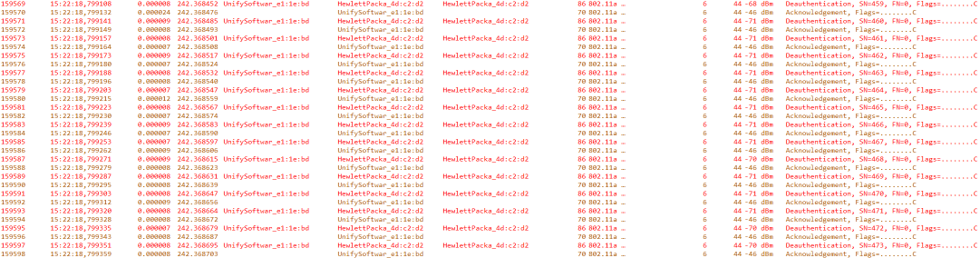
This sequence of QoS Null and disassociation keeps going on until the client begins sending deauthentication frames to the AP.
Client-inflicted full disconnect
Finally the client moved away from its connected access point and roamed to a neighboring access point.
Active scan and association to neighbor AP (34:8a:12:1c:7f:70)

After a few moments the client roamed back to its original access point.
Roam back to original AP

Strong signal and a clean roam, yet the client was tearing down its own connection. The frames told a story a dashboard never could.
The root cause
The missing power-save bit sent me back to the interoperability guide. The Quiet IE behavior was only validated for a complete Ascom i63 environment. Defined under 802.11h and reused by 802.11k, the Quiet IE instructs clients to fall silent for a measurement window — and with RRM enabled, the AP was advertising it. A native Ascom i63 handled this correctly. The Unify firmware, despite the shared chipset, did not.
The vendor said "same chipset." The firmware disagreed. Hardware equivalence did not mean behavioral equivalence.
The fix
Once the cause was understood, I disabled the Quiet IE on the affected SSID. The QoS Null floods stopped, the disassociations stopped, the call drops stopped.
What this case taught me
- Trust the Frames, Not the Guide. A certified interoperability guide is a starting point — not a guarantee. Configure, test, evaluate, retest. When the guide says one thing and the frames say another, trust the frames.
- Vendor Claims Are Not Ground Truth. Shared hardware chipset does not mean identical firmware behavior. The Unify device and the Ascom i63 shared hardware but handled the Quiet IE mechanism differently. That difference was invisible in all vendor documentation until it appeared in a live packet capture.
- Absence of Visible Errors Does Not Mean a Healthy Network. The network monitored clean because nothing it watched was wrong. The failure lived in client behavior at the frame level, below everything the management plane could see. Silence in the dashboard was not proof of health. In this case, silence was the problem.
- Protocol Knowledge Is a Diagnostic Tool. The CWAP curriculum teaches you how 802.11 clients are expected to behave. Without that baseline, a packet capture is just noise. It was only because I knew what correct behavior looked like that I could see, clearly, that what I was watching was wrong.